Lvm使用
LVM(Logical Volume Management)
Components of LVM
1.Physical Volumes
2.Volume Groups
3.Logical Volumes
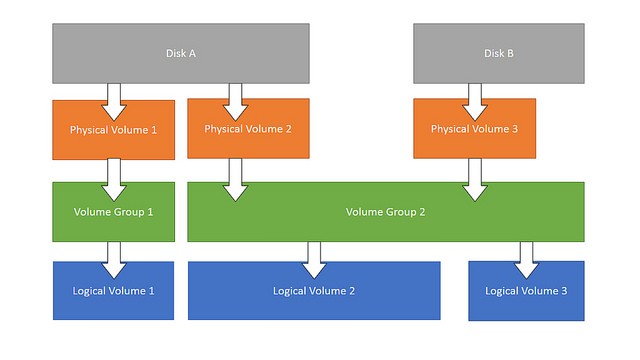
Install LVM
# centos
rpm -qa |grep lvm
yum install lvm2.x86_64
Create Disk Partition
fdisk /dev/vdb
.....
# change partition type to '8e'
:t
: 8e
w
大于2T的硬盘,使用GPT分区
# 安装分区工具
yum install -y parted
# 开始分区
parted /dev/vdb
# 交互命令行输入以下内容,设置分区格式为GPT分区
mklabel gpt
# 划分一个主分区、分区名为primary且100%容量给到第一个分区
mkpart primary 1 100%
# 运行以下命令,检查分区是否对齐,1为分区号
align-check optimal 1
# 查看分区表
print
# 退出Parted工具
quit
Create Physical Volumes(PV)
pvcreate /dev/vdb1
pvcreate /dev/vdc1
# list pv
pvs/pvdisplay
Create Volume Groups(PVG)
vgcreate vgdata /dev/vdb1 /dev/vdc1
# list pvg
vgs/vgdisplay
Extending or Reducing a volume group
vgextend vgdata /dev/sdd2
# Let's remove the physical volumes /dev/sdc and /dev/sdd1.
vgreduce vgdata /dev/vdb1
Create,Resize,Remove logical volume
# create
lvcreate -L 5GB -n zk1 vgdata
mkfs.ext4 /dev/vgdata/zk1 and mount ...
# resize,online add partition size
lvresize -L +20G -n /dev/vgdata/zk1
#if ext4 do
resize2fs /dev/vgdata/zk1
#if xfs do
xfs_growfs /dev/vgdata/zk1
# remove,you mast to umount volume and then lvremove
lvremove vgdata/zk1
# note!
if you want to reduce the size of logical volume,you mast to umount volume and then lvresize and  remount
How to remove a disk from LVM ?
1. make sure free disk can hold all existing data.
2. pvmove /dev/sdb1;it may be need long time ,you can do it in backroud ,pvmove /dev/sdb1 2>error.log >normal.log &
3. vgreduce vgdata /dev/sdb1
4. pvremove /dev/sdb1
5. If disk /dev/sdb do not have other partition ,you can now remove disk sdb.
6. udevadm info --query=all --name=/dev/vda | grep ID_SERIAL ;for aliyun to get disk id num
How to reduce the size of logical volume
1.umount /alidata/
2.e2fsck -fy /dev/vg1/data
3.resize2fs /dev/vg1/data 160G;resize lv to target 160G
4.lvreduce -L 160G /dev/vg1/data;lvreduce to target 160G,must equal to step 3
5.mount -a ;remount to use