Apisix初探
apisix 简介
-
官方架构图
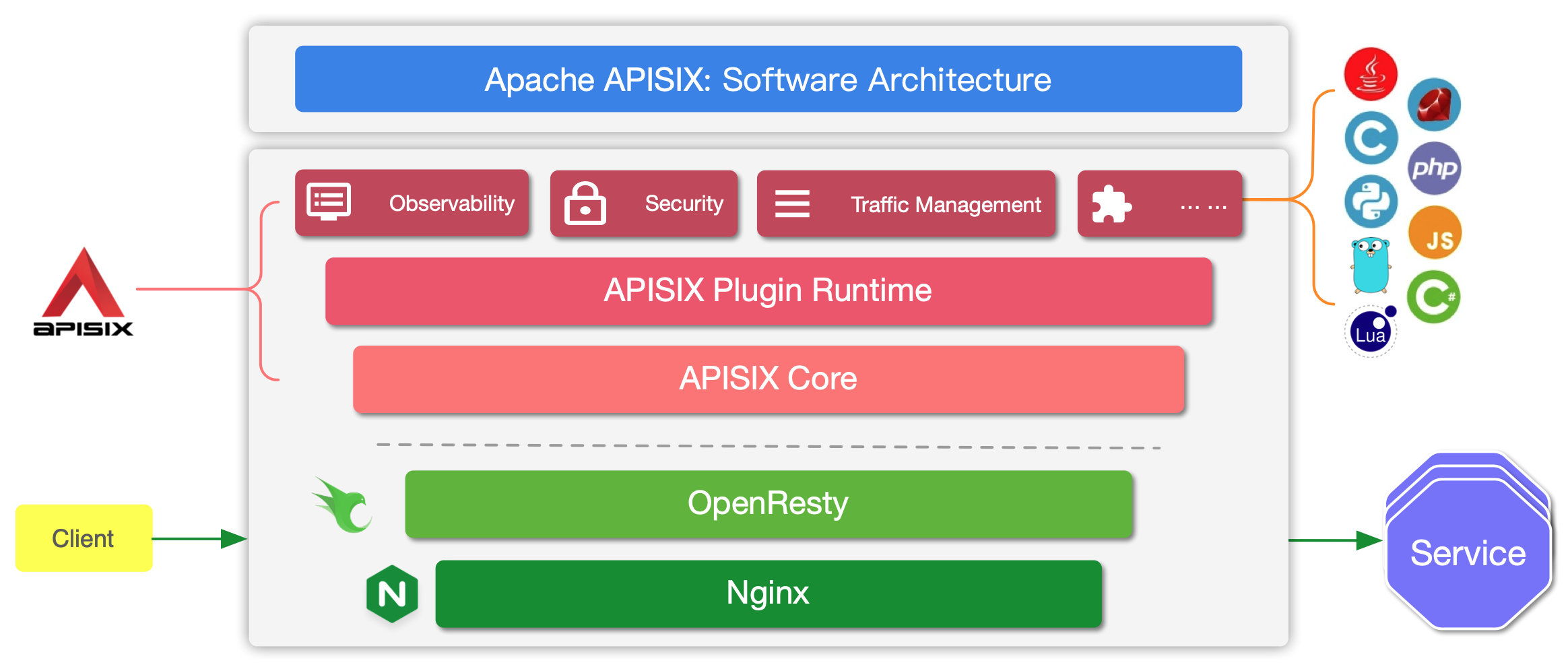
-
简介:
- Apache APISIX 是 Apache 软件基金会下的云原生 API 网关,它兼具动态、实时、高性能等特点,提供了负载均衡、动态上游、灰度发布(金丝雀发布)、服务熔断、身份认证、可观测性等丰富的流量管理功能。
-
一句话总结
- apisix基于Openrestry和丰富的lua插件来提供动态的网关能力,并借助etcd昨晚路由,服务,等元数据存储实现无状态的横向扩展
- 核心存储etcd需要至少3或者5节点来保障etcd的稳定性
主要特性
- 多平台支持:APISIX 提供了多平台解决方案,它不但支持裸机运行,也支持在 Kubernetes 中使用,还支持与 AWS Lambda、Azure Function、Lua 函数和 Apache OpenWhisk 等云服务集成。
- 全动态能力:APISIX 支持热加载,这意味着你不需要重启服务就可以更新 APISIX 的配置。请访问为什么 Apache APISIX 选择 Nginx + Lua 这个技术栈?以了解实现原理。
- 精细化路由:APISIX 支持使用 NGINX 内置变量做为路由的匹配条件,你可以自定义匹配函数来过滤请求,匹配路由。
- 运维友好:APISIX 支持与以下工具和平台集成:HashiCorp Vault、Zipkin、Apache SkyWalking、Consul、Nacos、Eureka。通过 APISIX Dashboard,运维人员可以通过友好且直观的 UI 配置 APISIX。
- 多语言插件支持:APISIX 支持多种开发语言进行插件开发,开发人员可以选择擅长语言的 SDK 开发自定义插件。
安装
- etcd集群容器化部署
apiVersion: apps/v1
kind: StatefulSet
metadata:
  name: mayastor-etcd
  namespace: mayastor
  labels:
    app.kubernetes.io/name: etcd
spec:
  replicas: 3
  selector:
    matchLabels:
      app.kubernetes.io/name: etcd
  serviceName: mayastor-etcd-headless
  podManagementPolicy: Parallel
  updateStrategy:
    type: RollingUpdate
  template:
    metadata:
      labels:
        app.kubernetes.io/name: etcd
      annotations:
    spec:

      affinity:
        podAffinity:

        podAntiAffinity:
          requiredDuringSchedulingIgnoredDuringExecution:
            - labelSelector:
                matchLabels:
                  app.kubernetes.io/name: etcd
              namespaces:
                - "mayastor"
        nodeAffinity:

      securityContext:
        fsGroup: 1001
      serviceAccountName: "default"
      initContainers:
        - name: volume-permissions
          image: docker.io/bitnami/bitnami-shell:10
          imagePullPolicy: "Always"
          command:
            - /bin/bash
            - -ec
            - |
              chown -R 1001:1001 /bitnami/etcd
          securityContext:
            runAsUser: 0
          resources:
            limits: {}
            requests: {}
          volumeMounts:
            - name: data
              mountPath: /bitnami/etcd
      containers:
        - name: etcd
          image: docker.io/bitnami/etcd:3.4.15-debian-10-r43
          imagePullPolicy: "IfNotPresent"
          lifecycle:
            preStop:
              exec:
                command:
                  - /opt/bitnami/scripts/etcd/prestop.sh
          securityContext:
            runAsNonRoot: true
            runAsUser: 1001
          env:
            - name: BITNAMI_DEBUG
              value: "false"
            - name: MY_POD_IP
              valueFrom:
                fieldRef:
                  fieldPath: status.podIP
            - name: MY_POD_NAME
              valueFrom:
                fieldRef:
                  fieldPath: metadata.name
            - name: ETCDCTL_API
              value: "3"
            - name: ETCD_ON_K8S
              value: "yes"
            - name: ETCD_START_FROM_SNAPSHOT
              value: "no"
            - name: ETCD_DISASTER_RECOVERY
              value: "no"
            - name: ETCD_NAME
              value: "$(MY_POD_NAME)"
            - name: ETCD_DATA_DIR
              value: "/bitnami/etcd/data"
            - name: ETCD_LOG_LEVEL
              value: "info"
            - name: ALLOW_NONE_AUTHENTICATION
              value: "yes"
            - name: ETCD_ADVERTISE_CLIENT_URLS
              value: "http://$(MY_POD_NAME).mayastor-etcd-headless.mayastor.svc.cluster.local:2379"
            - name: ETCD_LISTEN_CLIENT_URLS
              value: "http://0.0.0.0:2379"
            - name: ETCD_INITIAL_ADVERTISE_PEER_URLS
              value: "http://$(MY_POD_NAME).mayastor-etcd-headless.mayastor.svc.cluster.local:2380"
            - name: ETCD_LISTEN_PEER_URLS
              value: "http://0.0.0.0:2380"
            - name: ETCD_INITIAL_CLUSTER_TOKEN
              value: "etcd-cluster-k8s"
            - name: ETCD_INITIAL_CLUSTER_STATE
              value: "new"
            - name: ETCD_INITIAL_CLUSTER
              value: "mayastor-etcd-0=http://mayastor-etcd-0.mayastor-etcd-headless.mayastor.svc.cluster.local:2380,mayastor-etcd-1=http://mayastor-etcd-1.mayastor-etcd-headless.mayastor.svc.cluster.local:2380,mayastor-etcd-2=http://mayastor-etcd-2.mayastor-etcd-headless.mayastor.svc.cluster.local:2380"
            - name: ETCD_CLUSTER_DOMAIN
              value: "mayastor-etcd-headless.mayastor.svc.cluster.local"
          envFrom:
          ports:
            - name: client
              containerPort: 2379
              protocol: TCP
            - name: peer
              containerPort: 2380
              protocol: TCP
          livenessProbe:
            exec:
              command:
                - /opt/bitnami/scripts/etcd/healthcheck.sh
            initialDelaySeconds: 60
            periodSeconds: 30
            timeoutSeconds: 5
            successThreshold: 1
            failureThreshold: 5
          resources:
            limits: {}
            requests: {}
          volumeMounts:
            - name: data
              mountPath: /bitnami/etcd
      volumes:
  volumeClaimTemplates:
    - metadata:
        name: data
      spec:
        accessModes:
          - "ReadWriteOnce"
        resources:
          requests:
            storage: "2Gi"
        storageClassName: manual
- 无头服务mayastor-etcd-headless部署,略
- apisix安装
apiVersion: apps/v1
kind: Deployment
metadata:
  labels:
    app: apisix
  name: apisix
  namespace: kube-public
spec:
  progressDeadlineSeconds: 600
  replicas: 1
  revisionHistoryLimit: 10
  selector:
    matchLabels:
      app: apisix
  strategy:
    rollingUpdate:
      maxSurge: 25%
      maxUnavailable: 0
    type: RollingUpdate
  template:
    metadata:
      labels:
        app: apisix
    spec:
      containers:
      - name: apisix
        image: apache/apisix:2.14.1-alpine
        ports:
          - name: server
            containerPort: 9080
            protocol: TCP
          - name: ssl
            containerPort: 9443
            protocol: TCP
          - name: prometheus
            containerPort: 9091
            protocol: TCP
          - name: control
            containerPort: 9092
            protocol: TCP
        resources:
          limits:
            cpu: "1"
            memory: 2Gi
          requests:
            cpu: 600m
            memory: 600Mi
        terminationMessagePath: /dev/termination-log
        terminationMessagePolicy: File
        volumeMounts:
        - mountPath: /usr/local/apisix/conf/config.yaml
          name: apisix-config
          subPath: config.yaml
      dnsPolicy: ClusterFirst
      imagePullSecrets:
      - name: regsecret
      restartPolicy: Always
      schedulerName: default-scheduler
      securityContext: {}
      terminationGracePeriodSeconds: 30
      volumes:
        - name: apisix-config
          configMap:
            defaultMode: 420
            name: apisix-config
- apisix容器化环境部署,建议使用sts模式部署,方便配置promethues监控
- apisix-dashboard安装
- dashboard和apisix提供的api功能相同,都是用于读写etcd
测试
- 添加路由1
curl "http://127.0.0.1:9080/apisix/admin/routes/1" -H "X-API-KEY: edd1c9f034335f136f87ad84b625c8f1" -X PUT -d '{
  "uri": "/api/v5/*",
  "name": "out-going",
  "priority": 10, #url权重,数字越大优先级越高
  "host": "abc.test.com",
  "plugins": {
    "prometheus": {
      "disable": false # 开启路由的prometheus监控采集
    },
    "proxy-rewrite": {
      "regex_uri": [
        "^/api/v5/(.*)",
        "/$1"
      ] #删除部分uri前置后再转发给后端
    },
    "redirect": {
      "http_to_https": true # http强制跳转到https
    },
    "request-id": {
      "algorithm": "uuid",
      "disable": false,
      "header_name": "X-Request-Id", #header注入request id
      "include_in_response": true
    }
  },
  "upstream": {
    "nodes": [
      {
        "host": "outdingding",
        "port": 9001,
        "weight": 1
      }
    ],
    "timeout": {
      "connect": 6,
      "send": 6,
      "read": 30
    },
    "type": "roundrobin",
    "scheme": "http",
    "pass_host": "pass",
    "keepalive_pool": {
      "idle_timeout": 60,
      "requests": 1000,
      "size": 320
    }
  },
  "status": 1
}'
- 添加路由2
curl "http://127.0.0.1:9080/apisix/admin/routes/2" -H "X-API-KEY: edd1c9f034335f136f87ad84b625c8f1" -X PUT -d '{
  "uri": "/*",
  "name": "kafka-seeker",
  "priority": 1, #url权重,数字越大优先级越高
  "methods": [
    "GET",
    "POST",
    "PUT",
    "DELETE",
    "PATCH",
    "HEAD",
    "OPTIONS",
    "CONNECT",
    "TRACE"
  ],
  "host": "abc.test.com",
  "plugins": {
    "prometheus": {
      "disable": false
    },
    "redirect": {
      "http_to_https": true
    },
    "request-id": {
      "disable": false
    }
  },
  "upstream": {
    "nodes": [
      {
        "host": "kafka-seeker",
        "port": 9002,
        "weight": 1
      }
    ],
    "timeout": {
      "connect": 6,
      "send": 6,
      "read": 30
    },
    "type": "roundrobin",
    "scheme": "http",
    "pass_host": "pass",
    "keepalive_pool": {
      "idle_timeout": 60,
      "requests": 1000,
      "size": 320
    }
  },
  "status": 1
}'
- 路由1和2域名相同,uri有包含关系,并且是转发到不同的服务,因此需要priority来定义匹配优先级,
- 数字越大优先级预告,路由1的priority为10,路由2的priority为1,因此uri /api/v5/* 优先通过路由1转发到服务out-going而不是通过路由2转发到seeker
测试总结
-
优点:
- 路由实时下发,动态生效,不用重启openrestry,非常方便
- 插件丰富,提供了prometheus监控接口,request-id注入方便问题trace
-
缺点:
- 同一个域名如果有不同的uri转发,需要添加对应数量的路由规则,同时还需要考虑不同uri的权重问题,没有基于域名的全局Uri观测